
Quick Start Guide for SOM-352 Family
Objective
The purpose of this document is to provide necessary information to help setup and installation of SOM-352 series products. To provide for safe installation and operation of the equipment, read the safety guidelines at the beginning of this manual and follow the procedures outlined in the following chapters before connecting power to SOM-352. Keep this operating manual handy and distribute to all users, technicians and maintenance personnel for reference.
Reference
- PCI Express Mini Card Electromechanical Specification 2.0/2.1
- I-PEX MHF Micro RF coax connector product series catalog
- I-PEX MHF I Connector Instruction Manual (HIM-10002-06EN)
- Unex SOM-352 datasheet
- SOM-352 drawing 51-00009-02
- Unex’s documentation (in Unex’s software release package)
- NEO-M9V Integration manual (UBX-21029776)
Limited Warranty Policy
Unex Technology Corporation selling the product warrants that commencing from the date of shipment to customer and continuing for a period of twelve (12) months. This limited warranty extends only to the original customer of the product. Customer’s sole and exclusive remedy and the entire liability of Unex under this limited warranty will be, at Unex’s option, return for repair to Unex’s repair center with freight and insurance prepaid or shipment of a replacement within the warranty period or a refund of the purchase price if the hardware is returned to Unex. Unex’s obligations hereunder are conditioned upon the return of affected hardware in accordance with Unex’s service center’s then-current Return Material Authorization (RMA) procedures.
This warranty does not cover:
- Products found to be defective after the warranty period has expired.
- Products subjected to misuse or abuse, whether by accident or other causes. Such product conditions will be determined by Unex at its sole and unfettered discretion.
- Products damaged due to a natural disaster, including but not limited to lightning, flooding, earthquake, or fire.
- Software products.
- Products dismantled or opened by unauthorized persons. Please contact a representative of Unex if you need advanced technical support.
- Products with an altered and/or damaged serial number.
- Loss of data or software.
- Products that have been updated, reworked, or improperly tested by the Customer, or by a third party at the request of the Customer.
- Customized and original design manufacturer (ODM) products. The warranty terms for customized and ODM products should be defined in the contract that governs the project.
Safety Guidelines
- Keep working area clean and dry while assembling/installing.
- When operating under extreme temperature conditions, environmental control measures (e.g., heating, cooling) should be considered.
- Make sure every accessory has been fastened, including the V2X antenna cables, GNSS antenna cable, and the mPCIe socket latch/screws.
- Follow the Attention instructions.
Attention Follow the operation instructions to make sure the product functioning properly and to avoid product damages during handling / installation / operation.
- Follow the Caution instructions.
Caution Follow the safety instructions to keep users / operators from health hazards.
FCC Compliance and Advisory Statement
FEDERAL COMMUNICATIONS COMMISSION INTERFERENCE STATEMENT
This equipment has been tested and found to comply with the limits for a Class B digital device, pursuant to part 15 of the FCC Rules. These limits are designed to provide reasonable protection against harmful interference in a residential installation. This equipment generates, uses, and can radiate radio frequency energy and, if not installed and used in accordance with the instructions, may cause harmful interference to radio communications. However, there is no guarantee that interference will not occur in a particular installation. If this equipment does cause harmful interference to radio or television reception, which can be determined by turning the equipment off and on, the user is encouraged to try to correct the interference by one or more of the following measures:
- Reorient or relocate the receiving antenna.
- Increase the separation between the equipment and receiver.
- Connect the equipment into an outlet on a circuit different from that to which the receiver is connected.
- Consult the dealer or an experienced radio/TV technician for help.
CAUTION:
Any changes or modifications not expressly approved by the grantee of this device could void the user’s authority to operate the equipment.
This device complies with Part 15 of the FCC Rules. Operation is subject to the following two conditions: (1) this device may not cause harmful interference, and (2) this device must accept any interference received, including interference that may cause undesired operation.
RF Exposure warning
This equipment must be installed and operated in accordance with provided instructions and the antenna(s) used for this transmitter must be installed to provide a separation distance of at least 20 cm from all persons and must not be co-located or operating in conjunction with any other antenna or transmitter. End-users and installers must be provided with antenna installation instructions and transmitter operating conditions for satisfying RF exposure compliance.
Reference Note: The following section is provided as a reference for OEMs and host integrators who intend to incorporate this certified module into their final products. It outlines the necessary conditions and responsibilities to ensure continued compliance with FCC regulations.
Information for OEMs and host integrators
The OEM or integrator is obligated to adhere to these requirements and restrictions as a condition for using the module’s certification. The OEM or integrator is responsible to perform the required additional host regulatory testing and/or obtaining the required host approvals for compliance.
Per KDB 996369 D03 v01r01 OEM Manual section 2.2 to 2.12, this module is intended for OEM integrators under the following conditions:
2.2 List of applicable FCC rules
This module has been tested for compliance to FCC Part 95 Subpart L and Part 90 Subpart M.
2.3 Summarize the specific operational use conditions
The module is tested for standalone mobile RF exposure use condition. Any other usage conditions such as co-location with other transmitter(s) will need a separate reassessment through a class II permissive change application or new certification.
2.4 Limited module procedures
Not applicable, this device is a single modular approval.
2.5 Trace antenna designs
Not applicable. This module has its own antenna, and does not need a host’s printed board micro strip trace antenna, etc.
2.6 RF exposure considerations
This equipment complies with FCC mobile radiation exposure limits set forth for an uncontrolled environment. This equipment should be installed and operated with a minimum distance of 20 cm between the radiator & your body. A separate SAR/Power Density evaluation is required to confirm compliance with relevant FCC portable RF exposure rules.
2.7 Antennas
The following antennas have been certified for use with this module; antennas of the same type with equal or lower gain may also be used with this module, except as described below. The antenna must be installed such that 20 cm can be maintained between the antenna and users.
| No. | Manufacturer | Model No. | Antenna Type | Peak Gain (dBi) | Freq. Range (GHz) | Connector Type |
|---|---|---|---|---|---|---|
| 1 | Unex | EX-53 | Omni | 7.6 | 5795-5925 MHz | Type N plug |
| 2 | Unex | EX-55 | Omni | 5 | 5150-5950 MHz | FAKRA Z Jack |
| 3 | TOP-LINK | ZG-OI-596005-NM | Omni | 4 | 5800-6000 MHz | N-Male |
IMPORTANT: The final host product must have an integral antenna which is not removable by the end-user.
2.8 Label and compliance information
Label of the end product: The final end product must be labeled in a visible area with the following: “Contains FCC ID: NUK-VTX352C”. The grantee’s FCC ID can be used only when all FCC compliance requirements are met. The OEM integrator has to be aware not to provide information to the end user regarding how to install or remove this RF module in the user’s manual of the end product which integrates this module. The end product user manual shall include all required regulatory information/warning as shown in this manual.
2.9 Information on test modes and additional testing requirements
This transmitter is tested in a standalone mobile RF exposure condition and any co-located or simultaneous transmission with other transmitter(s) class II permissive change re-evaluation or new certification.
2.10 Additional testing, Part 15 Subpart B disclaimer
This transmitter module is tested as a subsystem and its certification does not cover the FCC Part 15 Subpart B (unintentional radiator) rule requirement applicable to the final host. The final host will still need to be reassessed for compliance to this portion of rule requirements if applicable. OEM/Host manufacturers are ultimately responsible for the compliance of the Host and Module. The final product must be reassessed against all the essential requirements of the FCC rule such as FCC Part 15 Subpart B before it can be placed on the US market. This includes reassessing the transmitter module for compliance with the Radio and EMF essential requirements of the FCC rules. This module must not be incorporated into any other device or system without retesting for compliance as multi-radio and combined equipment. As long as all conditions above are met, further transmitter test will not be required. However, the OEM integrator is still responsible for testing their end-product for any additional compliance requirements required with this module installed.
2.11 Note EMI Considerations
Note that a host manufacture is recommended to use D04 Module Integration Guide recommending as “best practice” RF design engineering testing and evaluation in case non-linear interactions generate additional noncompliant limits due to module placement to host components or properties. For standalone mode, reference the guidance in D04 Module Integration Guide and for simultaneous mode; see D02 Module Q&A Question 12, which permits the host manufacturer to confirm compliance.
2.12 How to make changes
Only Grantees are permitted to make permissive changes, if the module will be used differently than granted conditions, please contact us to ensure modifications will not affect compliance.
IMPORTANT NOTE: In the event that these conditions cannot be met (for example certain laptop configurations or co-location with another transmitter), then the FCC authorization is no longer considered valid and the FCC ID cannot be used on the final product. In these circumstances, the OEM integrator will be responsible for re-evaluating the end product (including the transmitter) and obtaining a separate FCC authorization.
Manual Information To the End User
The OEM integrator has to be aware not to provide information to the end user regarding how to install or remove this RF module in the user’s manual of the end product which integrates this module. The host integrator must follow the integration instructions provided in this document and ensure that the composite-system end product complies with the requirements by a technical assessment or evaluation to the rules and to KDB Publication 996369. The host integrator installing this module into their product must ensure that the final composite product complies with the requirements by a technical assessment or evaluation to the rules, including the transmitter operation and should refer to guidance in KDB 996369.
OEM/Host manufacturer responsibilities
OEM/Host manufacturers are ultimately responsible for the compliance of the Host and Module. The final product must be reassessed against all the essential requirements of the FCC rule such as FCC Part 15 Subpart B before it can be placed on the US market. This includes reassessing the transmitter module for compliance with the Radio and EMF essential requirements of the FCC rules. This module must not be incorporated into any other device or system without retesting for compliance as multi-radio and combined equipment.
Installation Instructions
| Attention |
|
|---|---|
| Caution |
To avoid risk of electrical shock, be sure to disconnect the electric power cords while installing / servicing the SOM-352 or the host system. |
IMU-mount Alignment
SOM-352 (0B) features an integrated onboard IMU (inertial measurement unit) for DR (dead reckoning) navigation. It is important to make sure the IMU orientation aligns with the vehicle chassis frame if mounted on a vehicle or a moving platform. Please refer to FIGURE 1: IMU ALIGNMENT for correct installation using default orientation settings.
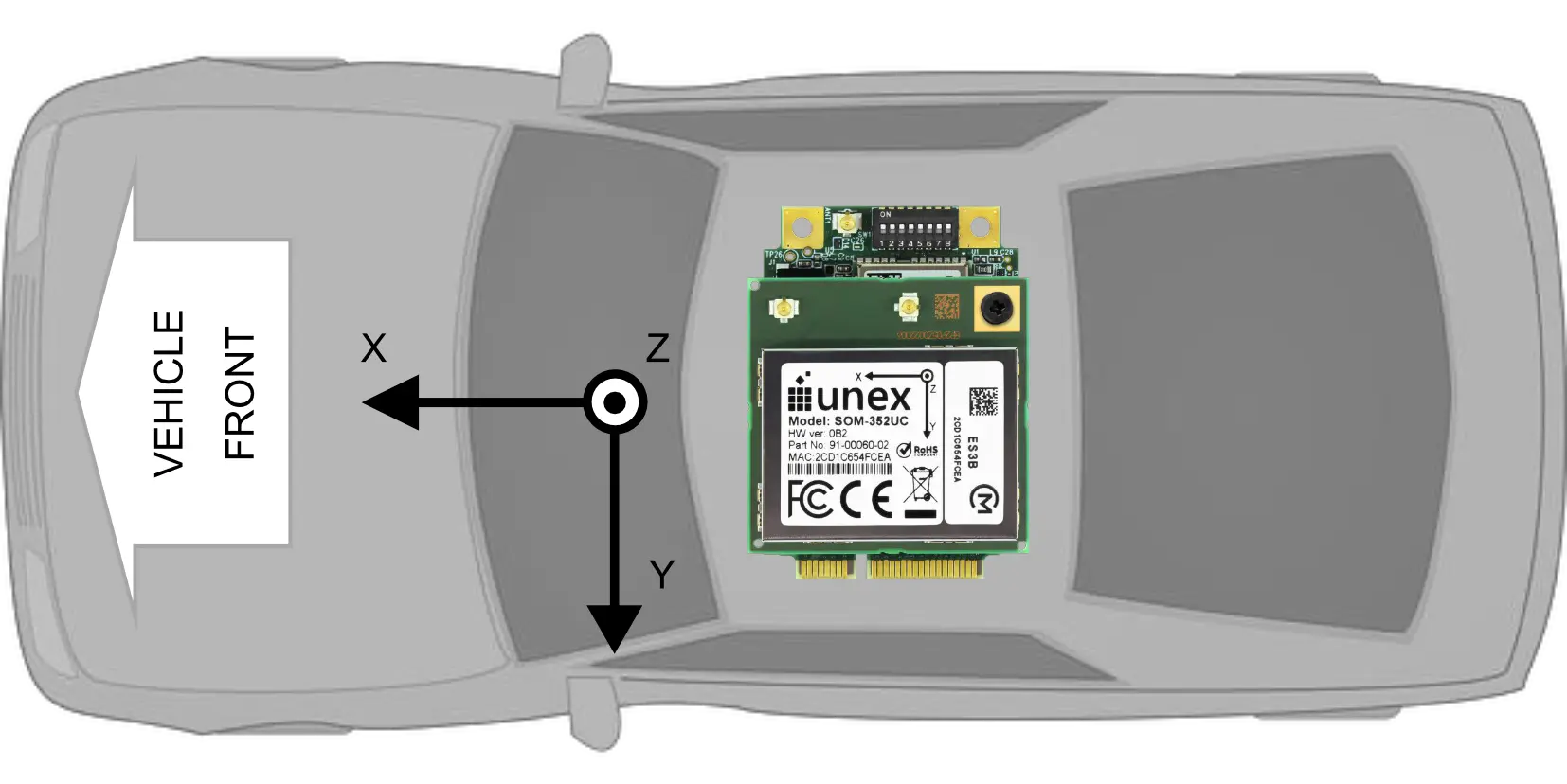
If the mounting orientation cannot align with vehicle chassis frame because of physical constrains, please refer to NEO-M9V Integration manual (UBX-21029776), section 3.2.4.1 for more detailed instructions.
For stationary applications such as an RSU, IMU alignment is not necessary.
Installation Steps
Follow the instructions below to install the SOM-352 into a host system:
- Shut down the host system and switch it off.
- Disconnect the host system from its power supply.
- Open the host system’s enclosure.
- Insert the SOM-352 into an empty PCI Express slot. Following the host systems’ instruction to complete the mechanical fastening.
- If a Molex Pico-Lock I/O cable is necessary for host system integration, connect it to the SOM-352. (see 10.3 I/O CABLE PINOUT)
- Connect GNSS antenna cable to the SOM-352. (see 10.1 ANTENNA CONNECTORS, 10.1.1 V2X)
- Connect V2X antenna cables to the SOM-352. (see 10.1 ANTENNA CONNECTORS, 10.1.2 GNSS)
- Close the host system’s enclosure.
- Reconnect the power supply of the host system.
Product Appearance
The photos in this document may differ from actual product; the Model and Part No. on label may differ for each model. However, the differences do not affect actual functionalities.

Functional Block Diagram
Electrical Characteristics
Absolute Maximum Ratings
Over operating free-air temperature range (unless otherwise noted).
| Parameters | Conditions | Min. | Max. | Unit |
|---|---|---|---|---|
| Storage Temperature | – | -40 | 105 | °C |
| Supply Voltage | mPCIe 5V | -0.3 | 5.25 | V |
| mPCIe 3.3 Vaux | -0.3 | 3.9 | V | |
| V2X maximum input level | – | – | 10 | dBm |
| GNSS maximum input level | – | – | 0 | dBm |
|
Note:
|
||||
Recommended Operating Conditions
Over operating free-air temperature range (unless otherwise noted).
| Parameters | Conditions | Min. | Typ. | Max. | Unit |
|---|---|---|---|---|---|
| Ta (Ambient operating temperature) | Free-air temp. | -40 | 25 | 85 | °C |
| Supply voltage | mPCIe 5V | 4.8 | 5.0 | 5.2 | V |
| mPCIe 3.3 Vaux | 3.0 | 3.3 | 3.6 | V | |
| VIL (Input low level voltage) | mPCIe 5V = 5.0V | -0.3 | – | 0.8 | V |
| VIH (Input high level voltage) | mPCIe 5V = 5.0V | 2.0 | – | 3.6 | V |
| TAMPER# | 2.0 | – | 3.3 Vaux+0.3 | V | |
| RPU (Equivalent pull-up) | 1PPS/UART *1 | 32 | 50 | 60 | kΩ |
| PERST#/EX_RSTn | 1.8 | 2.1 | 2.3 | kΩ | |
| TAMPER# *2 | 0.9 | 1.0 | 1.1 | kΩ | |
| RPD (Equivalent pull-down) | TAMPER# *3 | 32 | 50 | 60 | kΩ |
| VOL (Output low level voltage) | IOL= 4mA *4 | – | – | 0.4 | V |
| VOH (Output high level voltage) | IOH= 4mA *5 | 2.9 | – | – | V |
| mPCIe 1PPS (P49) tolerance | Accuracy/Bias | -100 | – | 100 | ns |
| Precision/Jitter | -30 | – | 30 | ns | |
| Pulse width | 15 | – | – | ns | |
| C-V2X sensitivity *6 | RB allocation=96 PER ≤ 10% | – | – | -86.1 | dBm |
| C-V2X maximum output power *7 | Target Power=23dBm, RB allocation=96 Power Class3 | 19.7 | 23 | 26.3 | dBm |
| C-V2x minimum output power *8 | Target Power=-30dBm, RB allocation=96 | – | – | -28.5 | dBm |
| C-V2X output power tolerance *9 | Test Point1 Power=-18dBm | -5 | – | 5 | dB |
| Test Point2 Power=15dBm | -5 | – | 5 | dB | |
| C-V2X adjacent channel leakage power ratio *10 | Target Power=23dBm, RB allocation=18, Start RB #: 82, EUTRA1 | 29.2 | – | – | dB |
| Target Power=23dBm, RB allocation=18, Start RB #: 0, EUTRA1 | 29.2 | – | – | dB | |
| Target Power=23dBm, RB allocation=96, Start RB #: 0, EUTRA1 | 29.2 | – | – | dB | |
| Carrier frequency accuracy | DSRC mode | -20 | – | 20 | ppm |
| DSRC sensitivity *11 | PER ≤ 10% | – | – | -86 | dBm |
| PER ≤ 10%, -40 – +85 °C | – | – | -82 | dBm | |
| DSRC maximum input level | PER ≤ 10% | -30 | – | – | dBm |
| DSRC adjacent channel rejection | – | 13 | – | – | dB |
| DSRC non-adjacent channel rejection | – | 29 | – | – | dB |
| DSRC output power | Spectrum mask Class C | 0 | – | 20 | dBm |
| V2X duty cycle *12 | Transmission | – | – | 20 | % |
| GNSS sensitivity | Acquisition | – | -146 | – | dBm |
| Navigation | – | -159 | – | dBm | |
| Tracking | – | -159 | – | dBm | |
| GNSS antenna bias VANT | IANT ≤ 20mA | 3.0 | – | 3.3 | V |
| GNSS antenna detection current *13 | IANT | 8 | – | 64 | mA |
| GNSS maximum total external gain | Gain/loss combined | – | – | 24 | dB |
| Antenna connector durability | Mating cycle limit | – | – | 30 | cycles |
|
Note:
|
|||||
Power Consumption
SOM-352 can be powered in two different ways: dual voltage (5V/3.3 Vaux) from mPCIe or 5V from external cable. The data listed in table 3 and table 4 serve only as a reference for system integrators. The actual conditions will vary depending on firmware version and user applications.
| Condition | Power Consumption (A) | ||||
|---|---|---|---|---|---|
| Temp. | Power Source | Voltage (V) | Low *1 | Typical *2 | High *3 |
| 25°C | 5V *4 | 5 | 0.34 | 0.40 | 2.0 |
| 3.3 Vaux *5 | 3.3 | 0.100 | 0.105 | 0.110 | |
| 85°C | 5V *4 | 5 | 0.38 | 0.44 | 2.0 |
| 3.3 Vaux *5 | 3.3 | 0.105 | 0.110 | 0.115 | |
|
Note:
|
|||||
| Condition | Power Consumption (A) | ||||
|---|---|---|---|---|---|
| Temp. | Power Source | Voltage (V) | Low *1 | Typical *2 | High *3 |
| 25°C | 5V *4 | 5 | 0.34 | 0.40 | 2.0 |
| 3.3 Vaux *5 | 3.3 | 0.100 | 0.105 | 0.110 | |
| 85°C | 5V *4 | 5 | 0.38 | 0.44 | 2.0 |
| 3.3 Vaux *5 | 3.3 | 0.105 | 0.110 | 0.115 | |
|
Note:
|
|||||
I/O Interfaces
Antenna Connectors
The SOM-352 mPCIe module is provided with three 50 Ω RF connectors (see ANTENNA CONNECTORS):
- two V2X antennas
- one GNSS antenna
Receptacle connectors are I-PEX MHF I 20279-001E-03. For more information about mating plug connectors, visit the website https://www.i-pex.com/product/mhf-I for details.
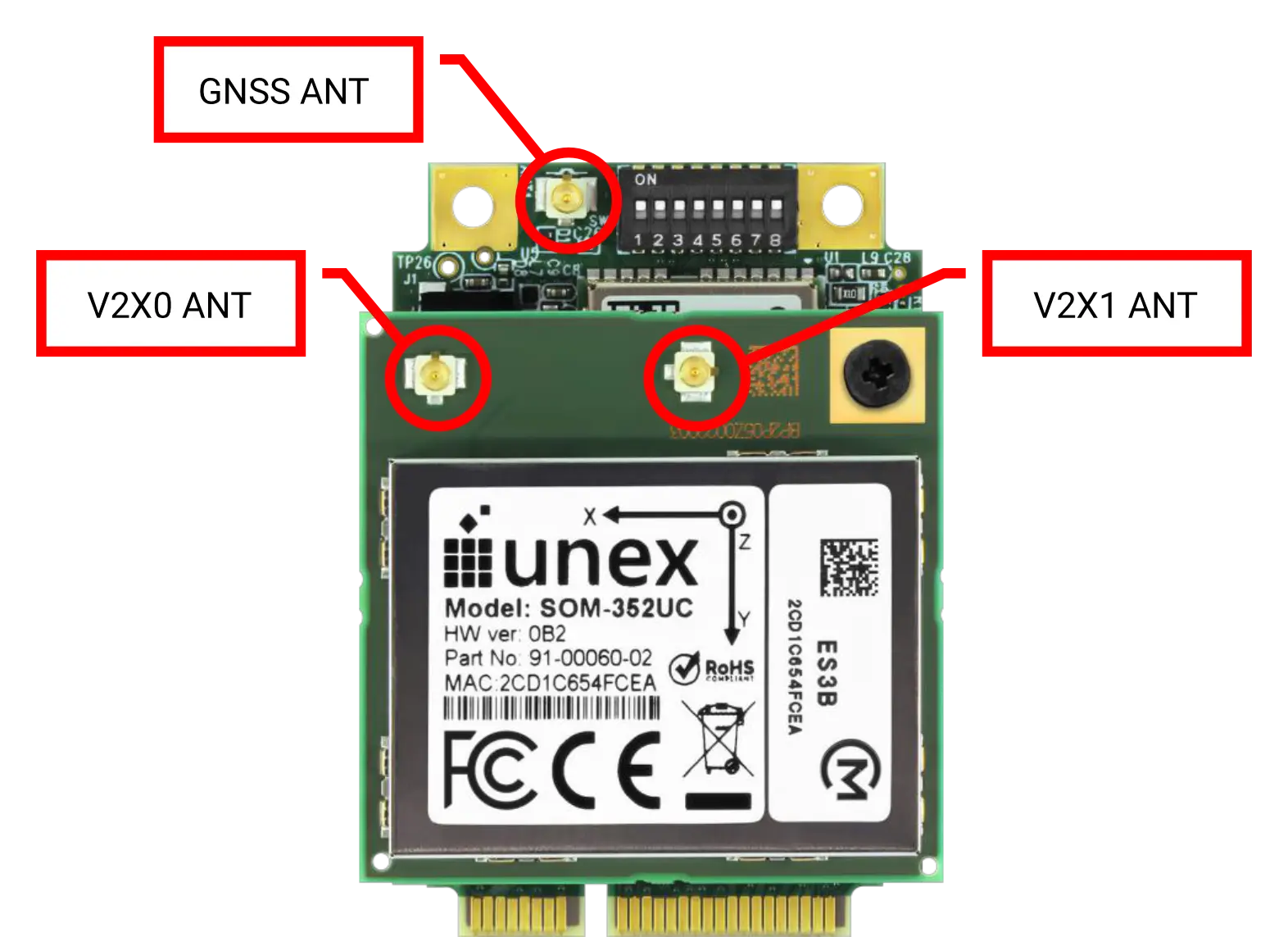
The antenna connection is one of the most important aspects in the full product design as it strongly affects the RF performance. Connecting cables between the module and the antenna must have 50 Ω impedance. If the impedance of the module is mismatched, RF performance will be reduced significantly.
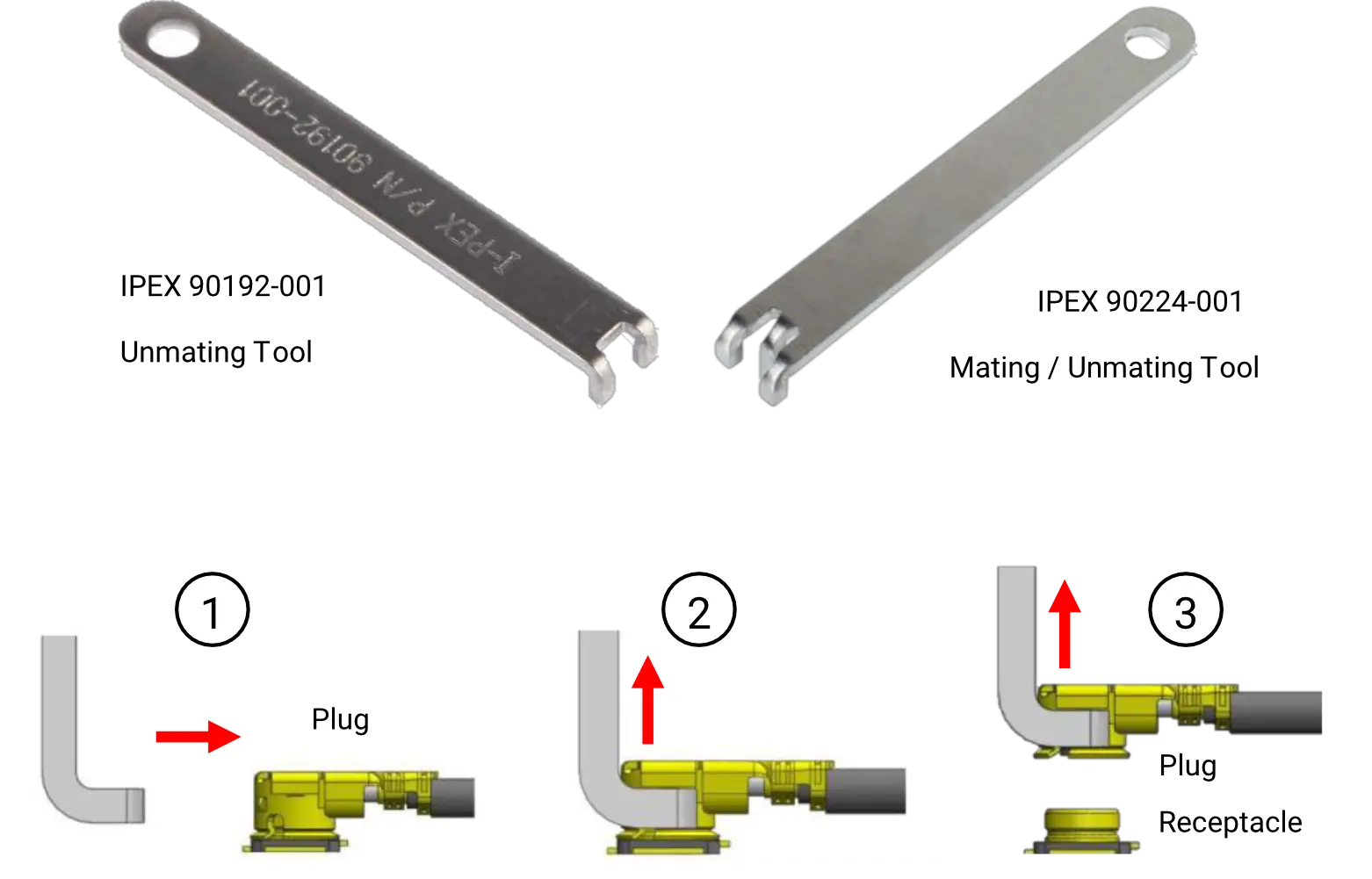
Please be careful when extracting the antenna cables from a SOM-352 module. Extracting the connector by pulling the cable may cause damage on the antenna plug assembly. It is recommended to extract the cable using a proper extraction tool suggested by the cable plug manufacturer. For I-PEX plugs please use I-PEX 90192-001 or 90224-001.
| Attention |
|
|---|---|
| Attention |
|
V2X Antenna Detection
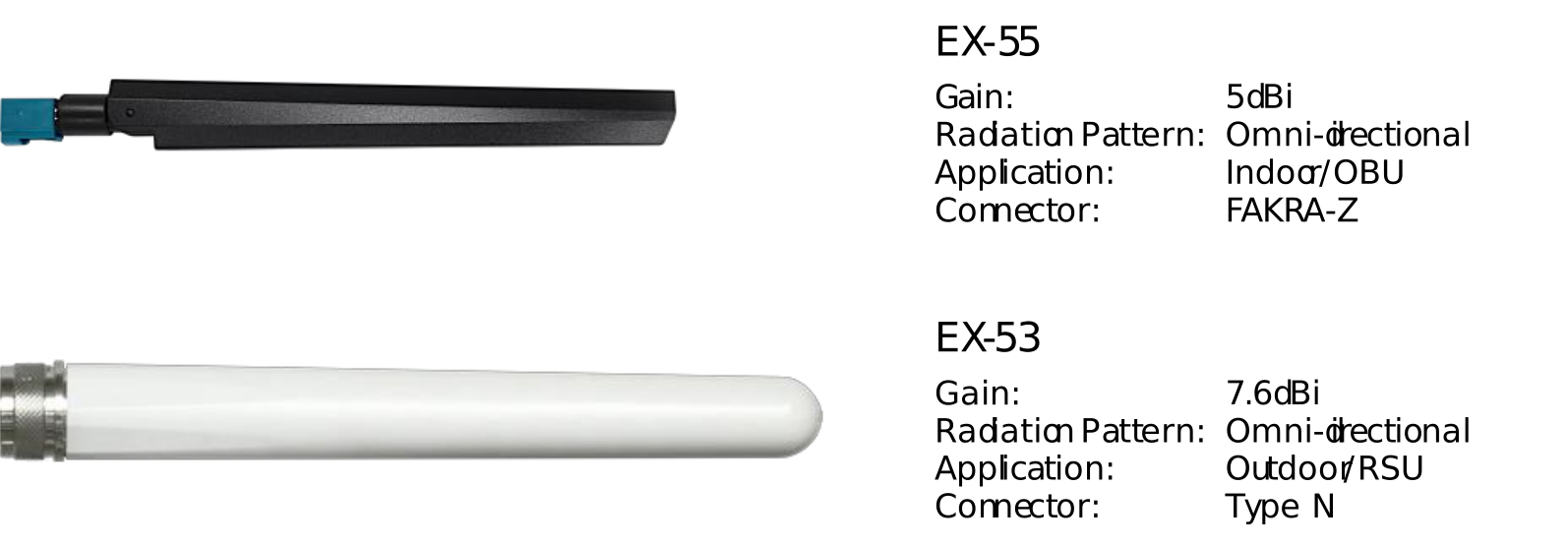
The V2X antenna ports has a built-in antenna detection function (see TABLE 5). This detection mechanism only works with Unex V2X antennas EX-55 or EX-53.
| Attention |
|
|---|
| Antenna Status | Value | Command |
|---|---|---|
| OPEN | 616-1023 | V2X0: cat /sys/bus/iio/devices/iio\:device0/in_voltage4_raw V2X1: cat /sys/bus/iio/devices/iio\:device0/in_voltage5_raw |
| NORMAL | 410-615 | |
| SHORT | 0-409 |
Please note that the EX-55/EX-53 antennas are not included in SOM-352 product package and can be purchased separately.
GNSS
For stable fix acquisition, at least 4 satellites with enough signal strength (C/N0 value above 30 dB-Hz) are required. If the signal strength goes below 30 dB-Hz, the fix will become unstable.
GNSS Antenna Detection
The antenna detection mechanism is a 2-step process: First check the signal strength. If the signal strength drops to zero, then check the antenna status flag.
When all the C/N0 values becomes null, it means that the GNSS antenna or its cable may either become detached or damaged. The GNSS antenna port has a built-in antenna detection function. The detection mechanism is based on the current consumption of an active antenna (IANT). If the active antenna consumes less current than 8 mA, then it is considered as the OPEN status; if the antenna consumes more than 64 mA, then it is
considered as the SHORT status. Anything between 8-64 mA is considered as the NORMAL status. In Unex SDK 1.13.10 or later, the OPEN/SHORT thresholds are saved in a config file /etc/unex/conf/bx_antenna_status.conf, and can be modified according to
the specific antenna of choice.
| Antenna Status | Ant Current IANT (mA) | 3.3V Bias VANT Status | Reading Value | Command |
|---|---|---|---|---|
| OPEN | < 8 | ON | 1000-1023 | cat/sys/bus/iio/devices/iio\:device0/in_voltage1_raw |
| NORMAL | 8 – 64 | ON | 999-825 | |
| SHORT | > 64 | OFF once triggered | 0-824 |
Unex’s proprietary gpsd software will monitor the antenna current (IANT) constantly. The GNSS 3.3V antenna bias (VANT) will be continuously supplied in OPEN/NORMAL status. However, once the SHORT status is triggered, the SHORT flag will persist, and the 3.3V bias will be turned off until the reset of the GNSS module. After the reset of the GNSS module, the detection process will start all over again. Turning off the VANT is done by
sending the commands listed in TABLE 7: GNSS 3.3V ANTENNA BIAS (VANT) STATUS to the u-blox NEO M9V module.
| VANT Status | LNA_EN status | UBX Command |
|---|---|---|
| ON | High | b5 62 06 8a 09 00 00 01 00 00 34 00 a3 10 00 81 3e |
| OFF | Low | b5 62 06 8a 09 00 00 01 00 00 34 00 a3 10 01 82 3f |
If Unex’s gpsd software is not used, then the monitoring of the IANT and control of 3.3V antenna bias should be implemented by user.
It is possible for a good active antenna to be reported OPEN because it consumes less current than 8 mA, or a good passive antenna to be considered SHORT because it is DC shorted (e.g., a slot antenna). However, as long as more than 4 satellites with enough signal strength (C/N0 value above 30 dB-Hz) present in sky view, the GNSS is considered in good state.
Mini PCIe Card Pinout
There are 3 groups of pins in the SOM-352 mPCIe pinout:
- Group 1: Proprietary pins, originally marked as reserved in mPCIe standard interface
- Group 2: Standard mPCIe pins used by SOM-352, including 3.3 Vaux, ground, PERST#, and USB data lines
- Group 3: Standard mPCIe pins but not used in SOM-352, marked NC
SOM-352 only needs group1 and group2 pins for normal operation. For maximize compatibility with existing mPCIe modules on the market, it is suggested to connect all three groups of pins to the mPCIe connector.
Please note that the I/O directions listed here are on the SOM-352 side. For designing a system board mPCIe interface, the input and output direction must be reversed.
| Pin | Symbol | Type | Level (V) | Description | Note |
|---|---|---|---|---|---|
| 1 | NC | – | – | Not connected | |
| 3 | 5V | P | 5 | 5V/2A power input | Proprietary |
| 5 | 5V | P | 5 | 5V/2A power input | Proprietary |
| 7 | NC | – | – | Not connected | |
| 9 | GND | G | – | Ground | |
| 11 | NC | – | – | Not connected | |
| 13 | NC | – | – | Not connected | |
| 15 | GND | G | – | Ground | |
| – | KEY | – | – | Mechanical key | |
| 17 | UART_RX | I (PU) | 3.3 | UART received data | Proprietary |
| 19 | UART_TX | O (PU) | 3.3 | UART transmitted data | Proprietary |
| 21 | GND | G | – | Ground | |
| 23 | NC | – | – | Not connected | |
| 25 | NC | – | – | Not connected | |
| 27 | GND | G | – | Ground | |
| 29 | GND | G | – | Ground | |
| 31 | NC | – | – | Not connected | |
| 33 | NC | – | – | Not connected | |
| 35 | GND | G | – | Ground | |
| 37 | GND | G | – | Ground | |
| 39 | 3.3 Vaux | P | 3.3 | Powered by 5V: 115mA (max) | |
| 41 | 3.3 Vaux | P | 3.3 | Powered by 5V: 115mA (max) | |
| 43 | GND | G | – | Ground | |
| 45 | 5V | P | 5 | 5V/2A power input | Proprietary |
| 47 | 5V | P | 5 | 5V/2A power input | Proprietary |
| 49 | 1PPS | I (PU) | 3.3 | GNSS 1PPS input (active HIGH) | Proprietary |
| 51 | TAMPER# | I (PU/PD) | 3.3 | Tamper detection (active LOW) PU/PD decided by SW1.7 TRIGGER_SW ON: 1KΩ PU TRIGGER_SW OFF: 32KΩ PD (min) |
Proprietary |
| Pin | Symbol | Type | Level (V) | Description | Note |
|---|---|---|---|---|---|
| 2 | 3.3 Vaux | P | 3.3 | Powered by 5V: 115mA (max) | |
| 4 | GND | G | – | Ground | |
| 6 | NC | – | – | Not connected | |
| 8 | NC | – | – | Not connected | |
| 10 | NC | – | – | Not connected | |
| 12 | NC | – | – | Not connected | |
| 14 | NC | – | – | Not connected | |
| 16 | NC | – | – | Not connected | |
| – | KEY | – | – | Mechanical key | |
| 18 | GND | G | – | Ground | |
| 20 | NC | – | – | Not connected | |
| 22 | PERST# | I (PU) | 3.3 | CRATON2 reset (2KΩ PU, active LOW) Signal rising edge (0 → 1) will reset mPCIe module |
|
| 24 | 3.3 Vaux | P | 3.3 | Powered by 5V: 115mA (max) | |
| 26 | GND | G | – | Ground | |
| 28 | NC | – | – | Not connected | |
| 30 | NC | – | – | Not connected | |
| 32 | NC | – | – | Not connected | |
| 34 | GND | G | – | Ground | |
| 36 | USB_D- | I/O | 0.4 | USB data line – | |
| 38 | USB_D+ | I/O | 0.4 | USB data line + | |
| 40 | GND | G | – | Ground | |
| 42 | NC | – | – | Not connected | |
| 44 | NC | – | – | Not connected | |
| 46 | BOOTSTRP | I (PD) | 3.3 | BOOT_SW ON: 0 or NC: Boot from NAND 1: Boot from USB0 (DFU mode) BOOT_SW OFF: 0/1/NC: Boot from USB0 (DFU mode) |
Proprietary |
| 48 | NC | – | – | Not connected | |
| 50 | GND | G | – | Ground | |
| 52 | 3.3 Vaux | P | 3.3 | Powered by 5V: 115mA (max) |
I/O Cable Pinout
The I/O cable can help user to install SOM-352 on an existing mPCIe system board without modifying the system board hardware. Make sure to set the SW1.1 configuration accordingly before the I/O cable is connected. Please see 10.4 DIP SWITCH and TABLE 11: DIP SWITCH FUNCTIONS for detailed instructions.
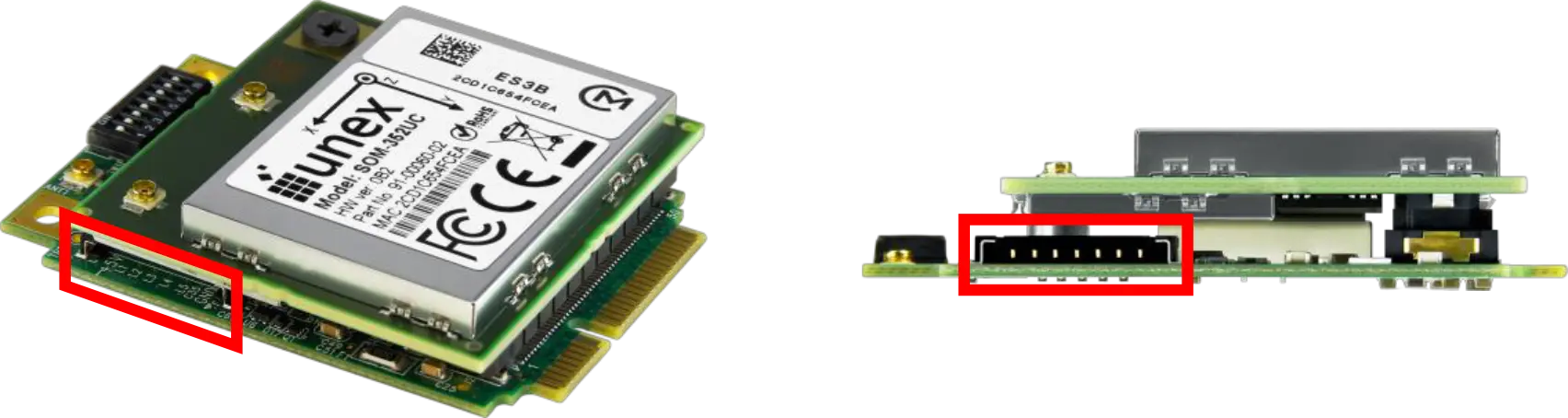
Please note that the pinout listed here is seen from the SOM-352 side. For designing an I/O cable interface on the system board, the input and output direction must be reversed.
| Pin | Name | Type | Level (V) | Description |
|---|---|---|---|---|
| J1.1 | 5V | P | 5 | 5V power |
| J1.2 | RXD | I | 3.3 |
UART RXD (PU) Internally tied with mPCIe P17 |
| J1.3 | TXD | O | 3.3 |
UART TXD (PU) Internally tied with mPCIe P19 |
| J1.4 | EX RSTn | I | 3.3 |
CRATON2 reset (PU) Internally tied with mPCIe P22 |
| J1.5 | 1PPS | I | 3.3 |
1PPS (PU) Internally tied with mPCIe P49 |
| J1.6 | TAMPER# | I | 3.3 |
Active LOW Internally tied with mPCIe P51 |
| J1.7 | GND | G | – | Ground |
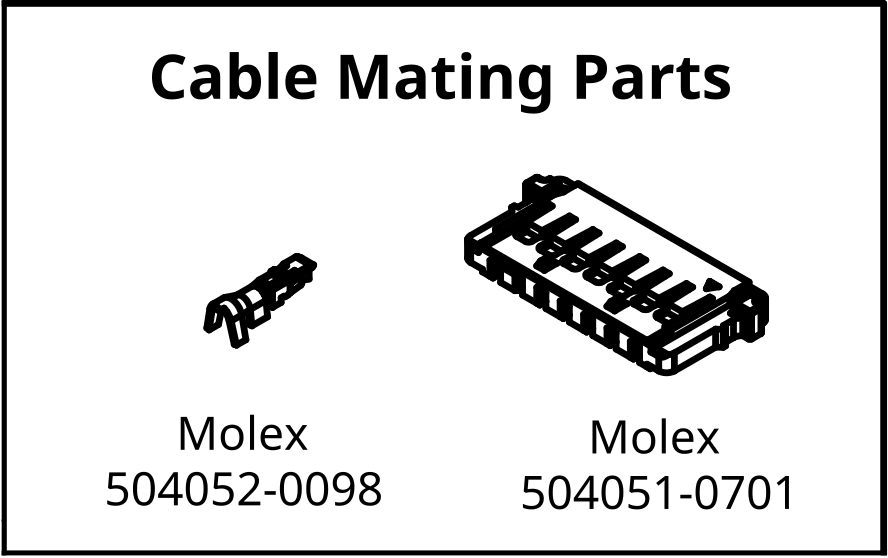
The 7-pin cable connector is Molex Pico-Lock system 504051-0 01 and the contact is 504052-00 8.
DIP Switch
The onboard DIP switch can help user to direct power and I/O signals from either mPCIe interface or the I/O cable. The tamper signal trigger mode and firmware upgrade can also be selected by user.
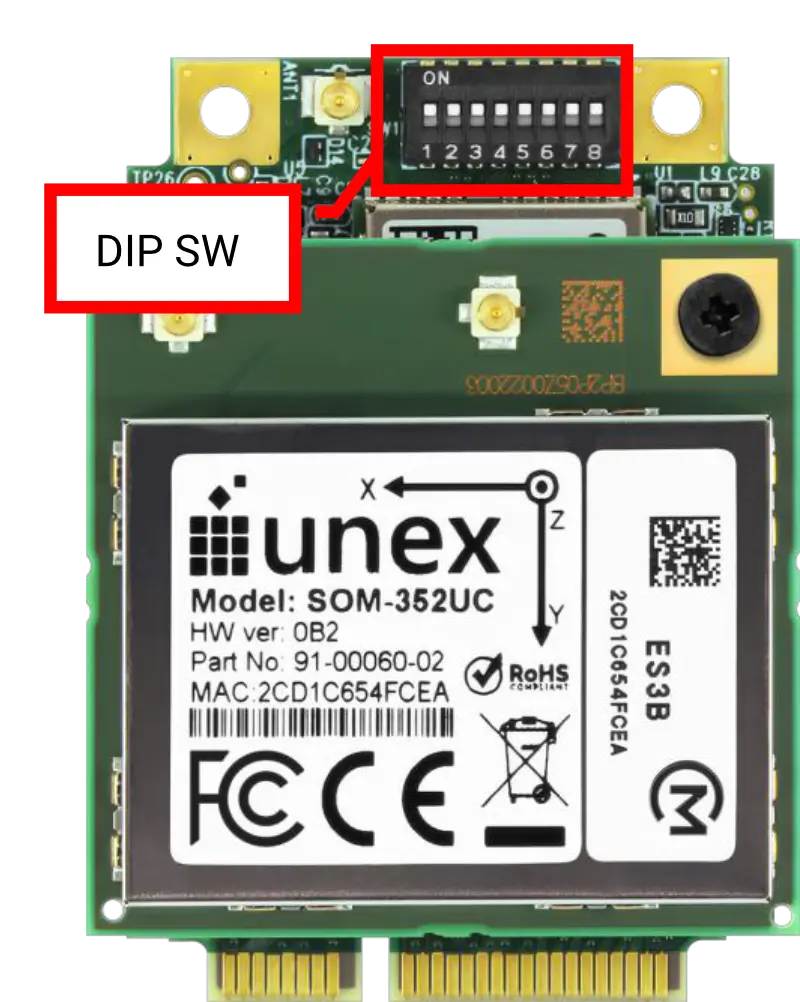
Please note that the in SW1.1 to SW1.6, the OFF position actually disconnects the power/signal from the mPCIe pin, while the ON position ties mPCIe pins and I/O cable pins together. In order to avoid interference and to keep 5V power from damaging your system board, it is important to set the DIP switch to correct positions before connecting the I/O cable.
Switching of internal/external GNSS and 1PPS signal is not controlled by DIP switch. Please see 11.8 1PPS for detailed instruction.
| Position | Name | ON Function | OFF Function |
|---|---|---|---|
| SW1.1 | 5V SW | 5V power from mPCIe | 5V power from cable |
| SW1.2 | RXD SW | UART RXD from mPCIe | UART RXD from cable |
| SW1.3 | TXD SW | UART TXD from mPCIe | UART TXD from cable |
| SW1.4 | EX RSTn SW | CRATON2 reset from mPCIe | CRATON2 reset from cable |
| SW1.5 | 1PPS SW | External 1PPS from mPCIe | External 1PPS from cable |
| SW1.6 | TAMPER# SW | TAMPER# from mPCIe | TAMPER# from cable |
| SW1.7 | TRIGGER SW | Trigger when tamper SW close to ground (1KΩ PU) | Trigger with tamper SW open from 3.3V (32KΩ PD) |
| SW1.8 | BOOT SW | Boot from NAND | Boot from USB0 (DFU) |
Design-in Guidelines
The SOM-352 pinout is compatible with most standard PCIe mini card interfaces. However, it may need to be fed with 5V DC power and connecting other I/O interfaces through an external cable when installed on an existing mPCIe system board. A customized PCIe mini card pinout can help user to get rid of the extra cable and to rely on the PCIe mini card interface alone. A design-in system board solution may provide improved reliability, simpler installation, and cost saving to the overall system.
Power Line Traces
- Power line traces should be as wide as possible, in order to reduce impedance of these lines.
- Crossing by any other lines of upper or lower layer should also be avoided.
- The maximum power consumption occurs during RF transmission. A typical transmitting frame lasts 1-2ms.
- It is recommended to keep the 5V supply current no less than 2A (continuous) to keep RF performance from degradation.
- If the SOM-352 halts or resets while performing a V2X RF transmission, it is recommended to add a bulk capacitor on the 5V trace near the mPCIe connector to lower the impedance of the 5V power rail.
Power Sequence
- 5V should be supplied prior to 3.3 Vaux.
- If 3.3 Vaux is fed before 5V, user should toggle the EX RSTn/PERST# signal after 5V is supplied.
- If it is intended to save power when the SOM-352 is not in use, it is suggested to pull low the EX RSTn/PERST# pin instead of cutting off 5V power. Once the EX RSTn/PERST# pin is pulled low, the SOM-352 will enter standby mode, and the power consumption will reduce to 10mA in about 10 seconds.
Brown Out
- If the 5V power supply drops below 3.5V, the SOM-352 will enter standby mode.
- A SOM in standby mode will stay in this mode until reset.
- Once the power supply returns to normal, the SOM-352 can reboot into normal operation with the rising edge of PERST# or EX RSTn signal.
Grounding
- Ensure good GND connection between the ground of the module and the ground of the system board.
- Grounding of the external components (e.g., capacitors) should be connected to the same reference ground of the module and not just on the top layer, use more than one via whenever possible to ensure good GND connection.
USB Data Lines
The SOM-352 mPCIe module includes a Universal Serial Bus (USB) transceiver, which operates at USB high-speed (480 Mbits/s). It is compliant with the USB 2.0 specification and can be used for control and data transfers as well as for diagnostic monitoring and firmware upgrade.
The USB port is typically the main interface between the SOM-352 mPCIe module and OEM hardware. Since the USB D+ and USB D- signals have a clock rate of 240 MHz, the signal traces must be routed carefully. Minimize trace lengths, number of vias, and capacitive loading.
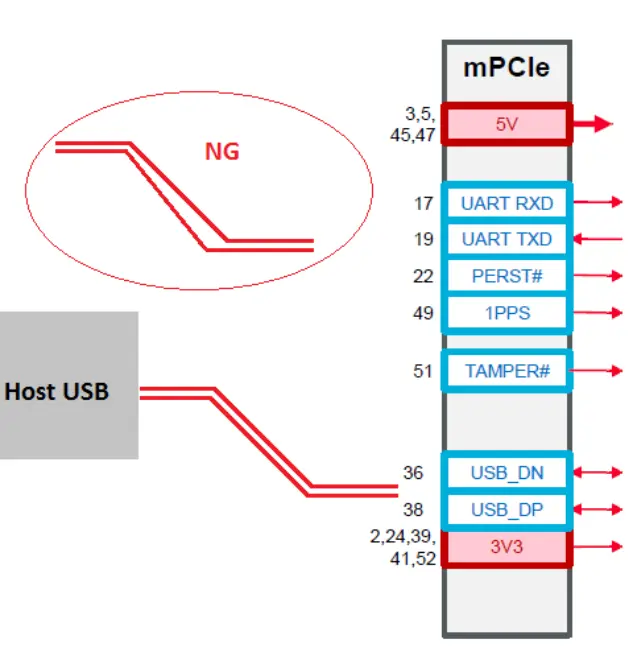
The layout guidelines for the USB data lines (mPCIe pin 36, 38) is listed below. And a routing example for two pairs of USB data buses is shown in FIGURE 10: USB DATA LINE ROUTING EXAMPLE.
- The impedance value should be as close as possible to 90 Ohms differential.
- The differential pair signals should be all referenced to ground.
- Differential pair route in parallel and in equal length.
- The amount of vias and corners used for the USB signal layout should be minimized; this is to prevent the occurrence of reflection and impedance changes.
- Each pair of USB data lines is required to be parallel to each other with the same trace length, and not parallel with other signals to minimize crosstalk.
- Separate the signal traces into similar groups and route similar signal traces together. In addition, it is recommended to have differential pairs routed together on the system board.
- For the USB traces, do not route them under oscillators, crystals, clock synthesizers, magnetic devices or IC’s which could be using duplicate clocks.
Serial Port
The serial port is typically a secondary interface between the SOM-352 mPCIe module and OEM hardware. The level for SOM-352 UART is 3.3V TTL logic level.
Depending on the design of serial port on the OEM hardware, a level translator circuit might be needed to make the system operate properly (e.g., 5V to 3.3V or 1.8V to 3.3V). The only configuration that does not need level translation is the 3.3V UART.
Reset
The reset pin (PERST#, P22) is low active, and will reboot Linux when a rising edge of input voltage (end of assertion) is detected. The reset pin is internally connected to 3.3V with a 2KΩ pull-up resistor. Connecting this pin to an open drain or open collector driver is recommended if the motherboard logic level is different from 3.3V TTL.
1PPS
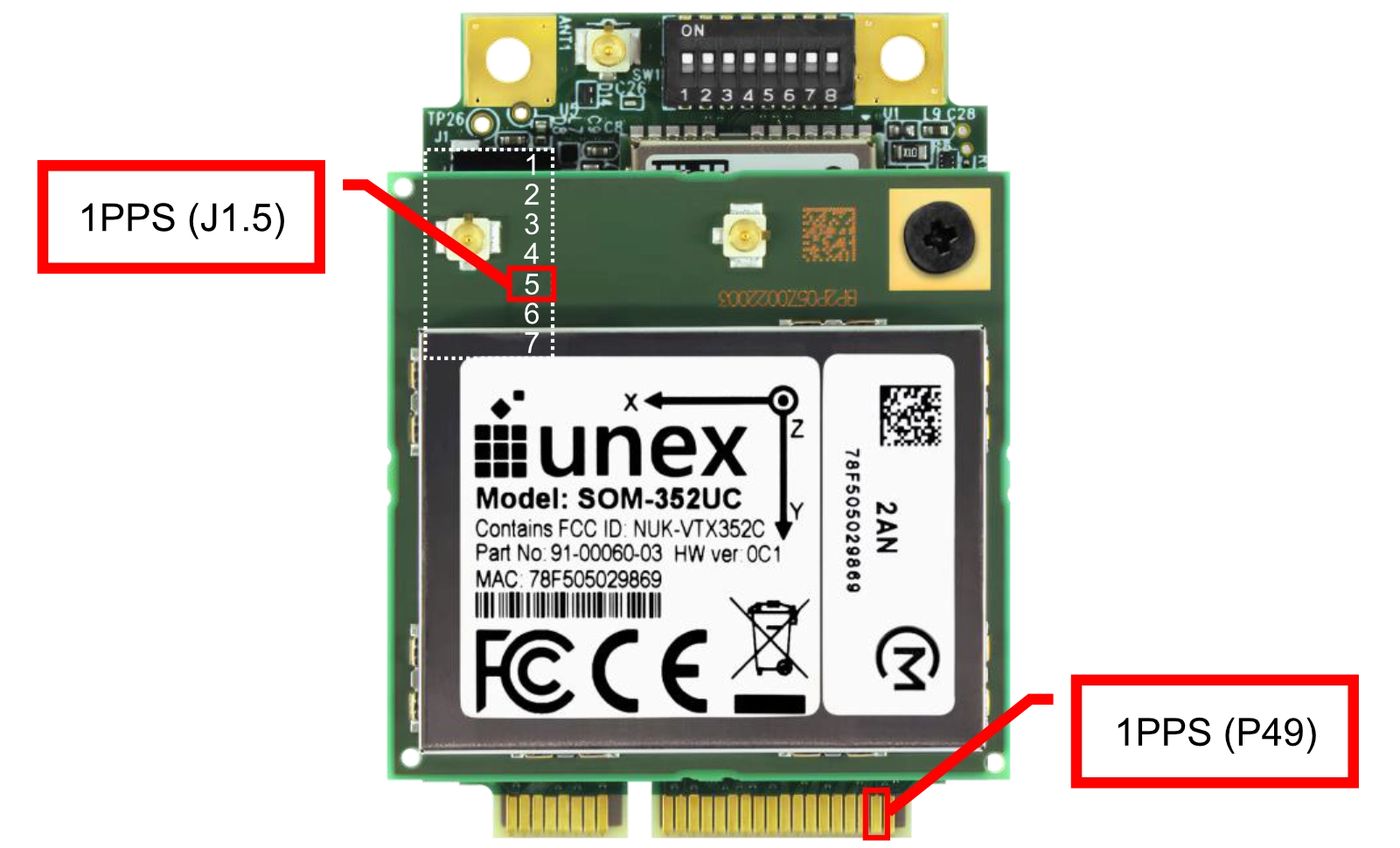
The 1PPS pin (P49) serves as the input of an external 1PPS (1 pulse per second) signal. The start of a system time (UTC time) second will line up with the rising edge of this time pulse signal. For timing and logic level of external 1PPS signal, please see TABLE 2. RECOMMENDED OPERATING CONDITIONS. Leave this pin open if not used.
External 1PPS pins are exposed in both mPCIe interface pin 49 and I/O cable pin 5. To avoid back powering and latch-up, external 1PPS should be fed to SOM-352 at least 20ms later than SOM-352 power up.
The 1PPS input pins (mPCIe pin 49 and I/O cable pin 5) will be pulled high by default during boot-up (up to 200ms). If the 1PPS also serves as BOOT MODE pin in the external GNSS module, for example like some Teseo III modules, it may cause boot-up failure of the external GNSS module. If this happens, you may need choose one of the following three solutions:
- Add a 3KΩ PD resistor on the motherboard side. (The internal PU resistance of SOM-352 is 32KΩ-60KΩ Ohm)
- Delay the boot-up of external GNSS module for 200ms until SOM-352 boot-up completed.
- Pull low the PERST#/EX RSTn signal during power up, and then release (or pull high) the PERST#/EX RSTn after the external GNSS module boot-up complete. The 1PPS pin (P49) will remain LOW until the release of PERST#/EX RSTn signal.
By default, the SOM-352 will use internal 1PPS signal. In order to change to external 1PPS and NMEA source, please issue the following commands in user space:
echo 100 > /sys/class/gpio/export
 echo out > /sys/class/gpio/gpio100/direction
 echo 0 > /sys/class/gpio/gpio100/value               # 0=Ext_GNSS, 1=Int_GNSS
To let the above setting take effect upon next boot-up, please append the above lines in /home/root/ext-fs/usr/bin/at_startup.
BOOTSTRP
The BOOTSTRP pin (P46) will be sampled during the first 10ms upon power up. If the BOOTSTRP is pulled HIGH (3.3V), the SOM-352 system will enter DFU (Device Firmware Upgrade) mode and allows the host system to flash the entire NAND via USB0 at once; otherwise, it will boot normally from NAND.
It is recommended to use a 0 Ohm resistor to pull-up the BOOTSTRP pin. The pull-up resistor of BOOTSTRP should not exceed 5 KOhm.
Tamper Detection (Optional)
The tamper detection function will be supported by project base. It is disabled by default. The SOM-352 has to be powered up for the tamper detection function to work. The design and implementation of a backup power source is not in the product scope and should be considered by the user.
The tamper detection mechanism is part of the FIPS 140-2 Level 3 security requirements. The tamper detection itself is carried out entirely in HW. On SW level, there is only an API that allows enabling the tamper detection mechanism. Calling this API will move tamper HW state from the testing mode to the production mode. Once called, it cannot move back to the testing mode.
The source and trigger mode of tamper detection signal can be selected with the DIP switch on SOM-352, position SW1.6 and SW1.7.
Tamper detection pins are exposed in both mPCIe interface pin 51 and I/O cable pin 6. Pulling the tamper detection pin to ground will trigger a tamper event, indicating that the enclosure of the system has been opened without proper authorization. User can enable one of the two tamper modes in API:
- Production mode
- Test mode.
Production Mode
In production mode, the SOM-352 will erase the CSP (critical security parameter) material saved in eHSM. The eHSM hardware will be left unusable because the CSP cannot be rewritten to the chip anymore. Two additional tamper modes are available when entering production mode: normal mode and standby mode.
Normal Mode
Tamper response provides protection against tamper attempts during operational state when the chip is powered on. When it is enabled, tamper event will immediately trigger the zeroization sequence. Enabling this mode is done by invoking the Enable Normal mode tamper response service API.
Standby Mode
Tamper response provides protection against tamper attempts while the chip is in sleep mode state. When it is enabled, any previously latched tamper event during sleep mode will trigger the zeroization sequence upon power-up. Enabling this mode is done by invoking the Enable standby mode tamper response service API.
Test Mode
In test mode, the SOM-352 will not erase the CSP (critical security parameter) material saved in eHSM. Each invocation of the tamper signal increments an internal counter within the eHSM. This counter can then be inquired by calling the eHSM runtime status API, providing evidence for the tamper signal detection.
Thermal Management
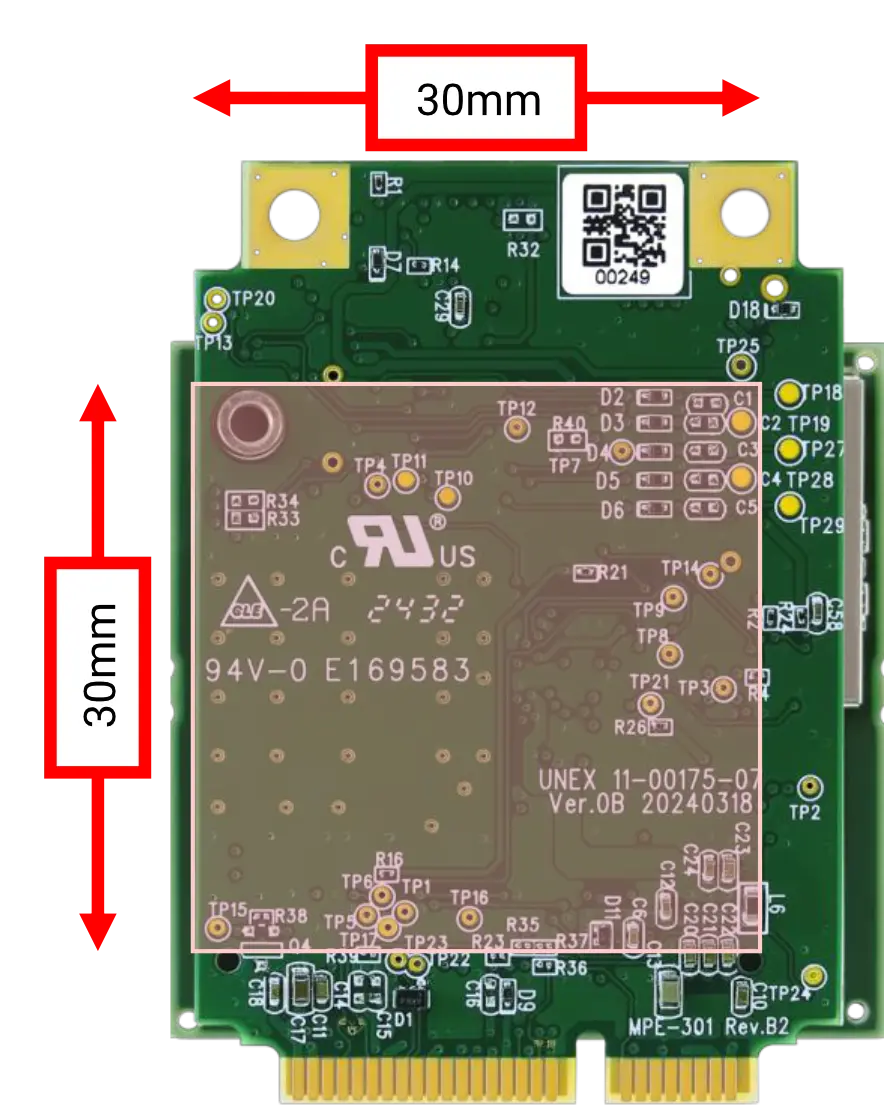
If performing heavy V2X transmission on SOM-352, it is recommended to add thermal vias and expose bare copper top layer on the system board to help disperse heat. Inserting a soft silicone thermally conductive pad between the system board and SOM-352 could facilitate heat dispersion to the system board more efficiently.
Firmware Upgrade
11.12.1. Manual control
When the mPCIe Pin 46 (BOOTSTRP) is left unconnected (floating) or connected to ground, the BOOT SW (SW1.8) controls the boot mode. See TABLE 11: DIP SWITCH FUNCTIONS for more details.
- BOOT SW ON: Normal boot (boot from NAND)
- BOOT SW OFF: Firmware upgrade (boot from USB0, DFU mode)
Host GPIO control
When the mPCIe Pin 46 (BOOTSTRP) connects to a host system GPIO, and the BOOTSW (SW1.8) is kept at ON position, the host system GPIO controls the boot mode. See TABLE 9: SOM-352 MINI PCIE ROW 1 PINOUT for more details.
- BOOTSTRP LO: Normal boot (boot from NAND)
- BOOTSTRP HI: Firmware upgrade (boot from USB0, DFU mode)
Dimensions and Weight
The SOM-352 module follows the PCIe full-mini card form factor, but 8.5mm wider than the standard 30mm width. When designing a system board, at least 3mm clearance on both left and right side is needed to avoid component interference. It is also recommended to reserve 13mm as total height limitation. Please refer to PCI Express Mini Card Electromechanical Specification 2.0/2.1 for more detailed guidelines.
It is recommended to use a mini PCIe connector with 4mm stack height, leaving 1.5mm space between the SOM-352 PCB and the system board. This space can later be filled with silicone thermal conductive pad to help dissipate the heat generated by SOM-352 to the system board PCB. User can choose TE 2041119-1 as a candidate for such a mini PCIe connector.

| Model | Length (mm) | Width (mm) | Height (mm) | Weight (g) |
|---|---|---|---|---|
| SOM-352 | 51.0±0.3 | 38.5±0.3 | 11.5±0.3 | 21.5±1 |
Component Keep Out Area
Maximum height of bottom side components may reach 1.0mm. In order to avoid interference with SOM-352, the system board side component height should be carefully considered according to the datasheet of mPCIe connector selected.
Software Settings
Unex BSP Interface Settings
The following BSP settings are applicable for Unex software package only.
| Function | Description |
|---|---|
| Console | UART3, 115200bps, 8N1, /dev/ttyAMA2 |
| GNSS NMEA protocol Standard/PUBX | UART1, 460800bps, 8N1, /dev/ttyAMA1 (PUBX only) (Note: NMEA Standard output is disabled in Unex’s SW package. If Unex’s SW package is not used, then NMEA standard output will be available in 38400bps.) |
| GNSS UBX protocol | USB1, /dev/ttyACM0 |
| GNSS antenna OPEN/SHORT thresholds | /etc/unex/conf/ubx antenna status.conf * Available in Unex SDK 1.13.10 or later |
| GNSS Reset | GPIO111, 0->1 = GNSS module reset (cold start, clear SRAM and RTC) |
| EXT GNSS SW | GPIO100. 0=Ext GNSS, 1=Int GNSS (default=1) |
| S GPIO3 | GPIO99, controls the SAFEBOOT N pin of u-blox NEO M9V 0 = Normal boot; 1 = safeboot mode (default=0) |
| TAMPER# | GPIO149 |
| 1PPS | GPIO25 (main), GPIO29 (aux) |
| USB0 | Default USB 2.0 device mode. RNDIS device IP = 192.168.1.3, RNDIS host IP = 192.168.1.1 |
| GNSS antenna detection | /sys/bus/iio/devices/iio\:device0/in voltage1 raw |
| V2X0 antenna detection | /sys/bus/iio/devices/iio\:device0/in voltage4 raw |
| V2X1 antenna detection | /sys/bus/iio/devices/iio\:device0/in voltage5 raw |
| MAC address | grep V2X 0 /etc/unex/device/device info.txt |
| BSP/protocol version | /etc/unex/update.log |
Verifying the Integration with a Host System
The following descriptions are applicable for Unex software package only.
Windows 10/11
For verifying the integration of a SOM-352 with a Windows host system, please follow the steps below:
- Install SOM-352 into a mini PCIe slot on a Windows host computer.
- Check if a network adapter named “Remote NDIS Compatible Device” can be found in Device Manager.
- Open Command Prompt on the Windows host.
-
Ping the RNDIS device IP of SOM-352 and check if it is alive.
C:\Users\user> ping 192.168.1.3 -
Open a SSH terminal to SOM-352 and check if it works.
C:\Users\user> ssh-keygen -R 192.168.1.3 & ssh root@192.168.1.3
For most Windows 10/11 systems, the RNDIS host driver is pre-installed by default. The Windows host will assign a default IP 192.168.1.1 to this new RNDIS network adapter. This default host IP address is configured in /etc/network/udhcpd.conf on the SOM-352 filesystem and can be modified if needed.
Linux
For verifying the integration of a SOM-352 with a Linux host system, please follow the steps below:
- Install SOM-352 into a mini PCIe slot on a Linux host computer.
- Open terminal on the Linux host.
- Check if the RNDIS driver has already been installed on the host system. If it has not been installed yet, install the RNDIS driver for the host system. The driver installation might include loading rndis_host.ko with modprobe command or enabling
CONFIG_USB_NET_RNDIS_HOSTwhen compiling the Linux kernel. The detailed instructions of installing the RNDIS driver are not included here because it may vary from one distribution to another.user@host:~$ lsmod | grep rndis - Check if the Unex device has been registered as a RNDIS device with a network interface.
user@host:~$ dmesg | grep -i -C4 unex - Ping the RNDIS device IP of SOM-352 and check if it is alive.
user@host:~$ ping 192.168.1.3 - Open a SSH terminal to SOM-352 and check if it works.
user@host:~$ ssh-keygen -R 192.168.1.3 ; ssh root@192.168.1.3
For most desktop Linux distributions, the RNDIS host driver is installed by default. The Linux host will assign a default IP 192.168.1.1 to this new RNDIS network adapter. This default host IP address is configured in /etc/network/udhcpd.conf on the SOM-352 filesystem and can be modified if needed.
Troubleshooting
No Response After Applying Power
This phenomenon may come from multiple causes. Please follow the steps below to check each one of them:
- Check if the 5V/3.3V power have been properly supplied by your motherboard.
- Check if the SW1.1 setting matches your hardware configuration.
- Check if the SW1.8 setting is at ON (Boot from NAND) position.
- Connect the UART console to your host.
- If you have a design-in UART interface in mPCIe P17/P19, make sure to keep the SW1.2/SW1.3 at ON position.
- If you do not have design-in UART, please connect the I/O cable for UART interface and keep the SW1.2/SW1.3 at OFF position.
- Check if the RNDIS driver has been properly installed on your host system.
- Check if the IP address 192.168.1.1 has been assigned to another network interface on your host system. If it has already been assigned, it is required to perform either of the following operations:
- Change the IP setting of that network interface on your host system and leave 192.168.1.1 available for the SOM-352 family RNDIS interface.
- Change the SOM-352 family RNDIS IP address setting. Please refer to the CHANGING SYSTEM IP ADDRESS section in Unex’s documentation, which can be found in Unex’s software release package.
No TX/RX Activities during Over-the-Air Testing
- Check the antenna status of both V2X antennas on the TX node and the Rx node.
- If Unex’s V2X antennas EX-55/EX-53 are used, use the V2X antenna detection commands listed in TABLE 13: UNEX BSP INTERFACE SETTINGS. For OPEN/SHORT value range, please see TABLE 5: V2X ANTENNA STATUS.
cat /sys/bus/iio/devices/iio\:device0/in_voltage4_rawcat /sys/bus/iio/devices/iio\:device0/in_voltage5_raw - If Unex’s V2X antennas EX-55/EX-53 are not used, it is the user’s responsibility to check the antenna OPEN/SHORT status.
Attention - Performing transmission under OPEN/SHORT conditions may cause permanent damages to RF components.
- Always check antenna status before any V2X TX activity.
- If Unex’s V2X antennas EX-55/EX-53 are used, use the V2X antenna detection commands listed in TABLE 13: UNEX BSP INTERFACE SETTINGS. For OPEN/SHORT value range, please see TABLE 5: V2X ANTENNA STATUS.
- For DSRC systems:
-
Send 10 V2X packets with priority 7 in TX node.
diag-cli <<< $'chan freq 0 5860\nv2x send 0 0 0 400 10 10 7 160\nstats\nexit' 2>/dev/null
-
Check MAC/PHY statistics in RX node
diag-cli <<< $'chan freq 0 5860\nstats\nexit' 2>/dev/null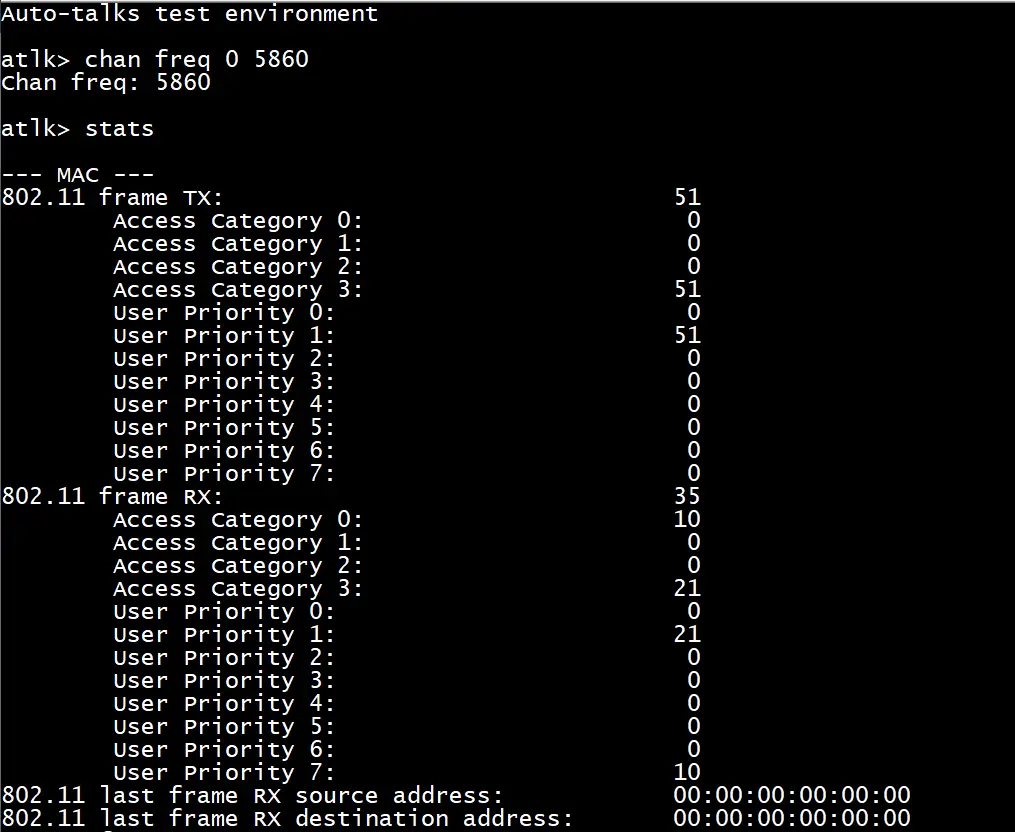
-
Send 10 V2X packets with priority 7 in TX node.
- For C-V2X systems
- Check GNSS antenna and GNSS health status. C-V2X requires GNSS time synchronization and TSF (Timing synchronization function) synchronization with GNSS 1PPS before any transmission.
- Make sure the very same /usr/bin/cv2x_rrc_config.uper and
/usr/bin/cv2x_sw_config.txtare uploaded on both TX and RX nodes. - If the SOM-352 comes with Unex’s C-V2X protocol stack, then use
gnss_healthcommand to check the overall GNSS system healthiness.ACL_TIME_SYNC_SYNCEDmeans the access layer (i.e., the TSF timer) has been successfully synchronized.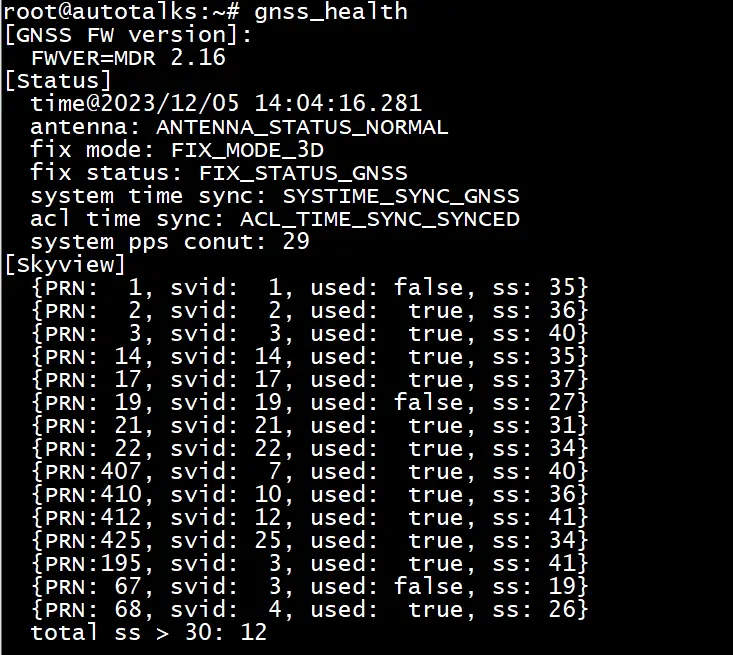
- If the SOM-352 comes without Unex’s C-V2X protocol, then use the following commands.
- Check the GNSS antenna status and fix mode.
cat /sys/bus/iio/devices/iio\:device0/in_voltage1_raw
For GNSS antenna status, please see TABLE 6: GNSS ANTENNA STATUS; for GNSS fix mode, please check the 2nd field of GSA sentence:
$GNGSA,A,3 ,24,15,10,23,12,32,,,,,,,2.6,1.4,2.1*2EFFix Mode: 1 = Fix not available; 2 = 2D fix; 3 = 3D fix.
- Check 1PPS status
watch -n 1 grep pps /proc/interrupts
If the
pps1.-1count is increasing, then the 1PPS is working. - Check TSF synchronization status
diag-cli <<< 'ddm tsf get' 2>/dev/null | grep =
If it shows
TSF lock status = locked, then TSF is synchronized.
- Check the GNSS antenna status and fix mode.
- Make sure the very same /usr/bin/cv2x_rrc_config.uper and
- If the SOM-352 comes with Unex’s C-V2X protocol, stop Unex’s V2X services on both TX and RX nodes before running
cgencommandd=/etc/runit/svdir/;svstop(){ [ -e $d$s ] && sv stop $d$s; }; for s in v2xcastd ssmed ssmd dot3d gnd;do svstop;done - Clear MAC/PHY statistics on the RX node
cd /usr/bin;cgen freq=5915 run=cyq 2>/dev/null
- Send 10 V2X packets from the TX node
cd /usr/bin;cgen power=40 freq=5915 num=10 run=wwwcgtwzq 2>/dev/null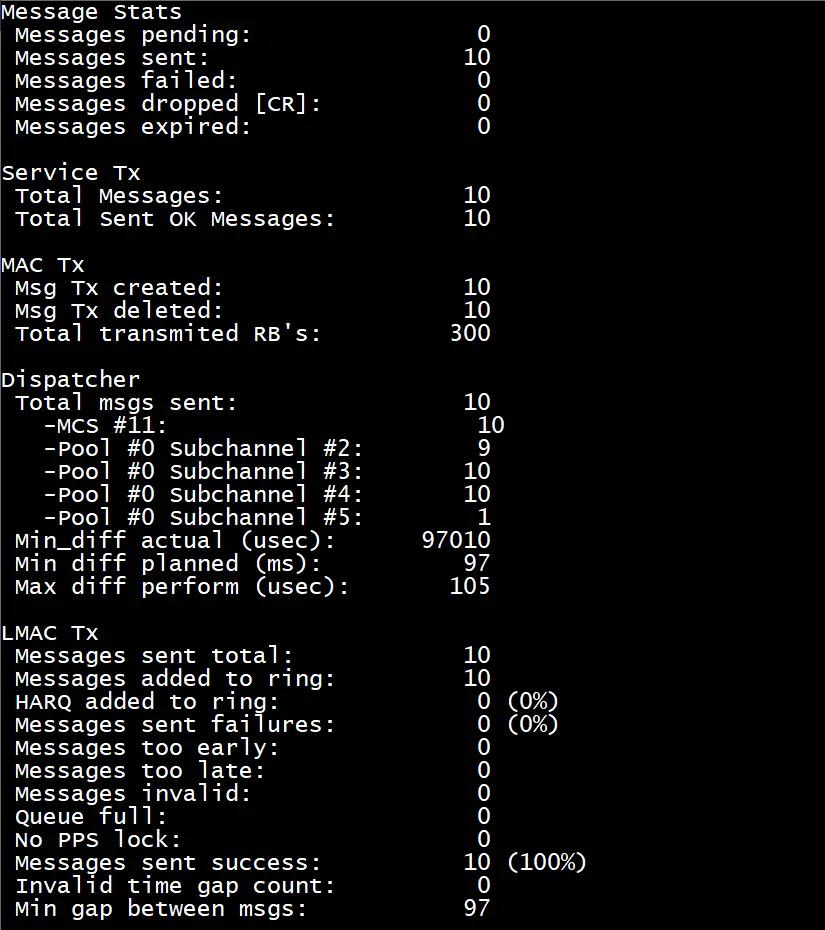
- Check MAC/PHY statistics on the RX node
cd /usr/bin;cgen freq=5915 run=yq 2>/dev/null
- Check GNSS antenna and GNSS health status. C-V2X requires GNSS time synchronization and TSF (Timing synchronization function) synchronization with GNSS 1PPS before any transmission.